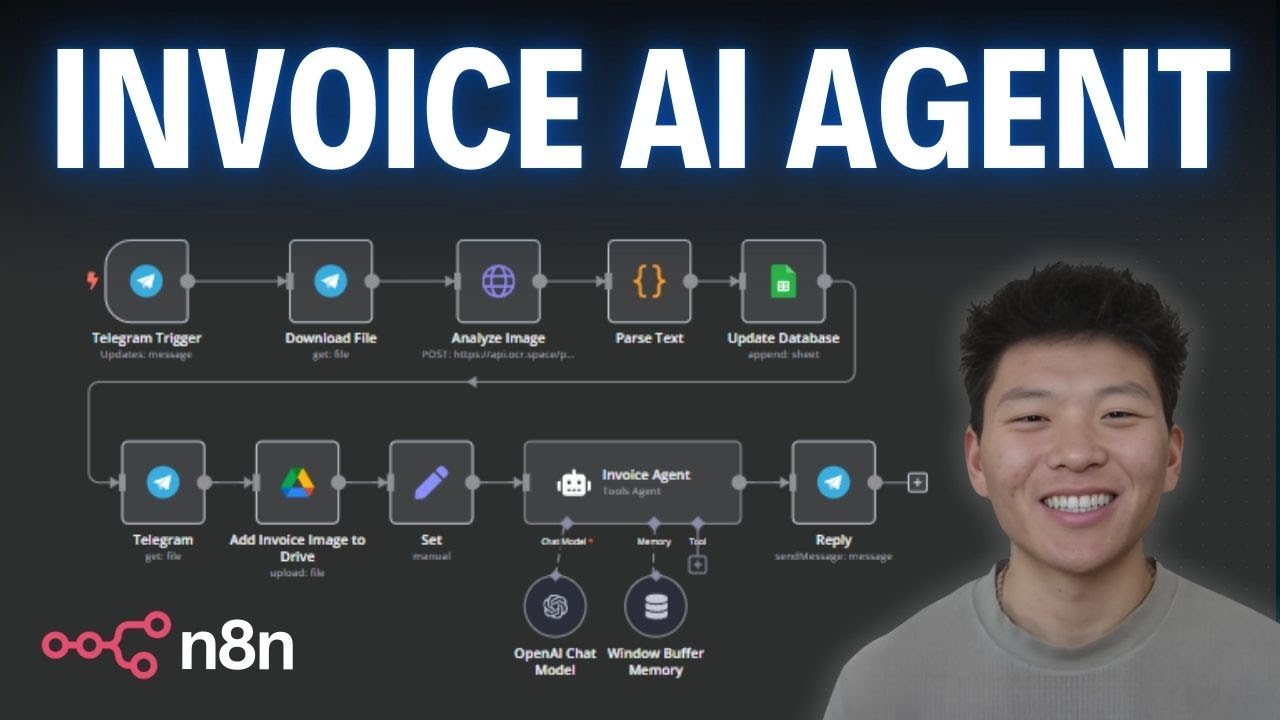
This AI Agent Extracts Text From Images in n8n
Keywords
Summary
139 words
Critical Evaluation
Value of the Information & Strength of the Argument
The video provides a clear, step-by-step tutorial with a live demonstration, making it easy to follow. The creator explains the purpose of each node and the logic behind the workflow. He also shares practical tips, such as selecting the largest file ID for better quality and using a tools agent instead of a conversational agent for more reliable output. The argumentation is based on personal experience and practical results, which is appropriate for a tutorial. However, the video lacks a critical evaluation of the OCR accuracy or a comparison with alternative methods, which would strengthen the technical value.
Scientific Rigor, Source Quality, Title Accuracy
The creator mentions the OCR API used (ocr.space) and provides a link in the description. He also references his Skool communities for workflow downloads and further learning. The title accurately reflects the content. The video is a tutorial, so the sources are primarily the tools and platforms used. The creator does not cite any scientific literature or external references. The description includes affiliate links, which are disclosed. Overall, the sources are relevant but limited to the tools demonstrated.
191 words
Title / Content Match
The title accurately reflects the content: the video demonstrates an AI agent that extracts text from images using OCR within n8n.
Quality & Reliability
7/10
The video is a practical tutorial demonstrating a functional n8n workflow. The creator explains each step clearly and provides a live demo. However, the content is based on personal experience and lacks rigorous scientific validation or comparative analysis. The OCR API used is free and has limitations, which are mentioned. The workflow is reproducible, but the creator does not discuss potential errors or edge cases in depth.
Chapters
Cited Sources
- n8n partner link — Affiliate link to sign up for n8n, the automation platform used in the tutorial.
- OCR API (ocr.space) — The OCR API used in the video to extract text from invoice images.
- Skool community (free) — Free community where the workflow can be downloaded.
- Skool community (paid) — Paid community for deeper learning and projects.
- Background music — Background music used in the video.
- Watch next video — Suggested next video by the creator.
Concurring Sources
- OCR.space API documentation — The API used in the video; its documentation confirms the features and limitations mentioned.
Contribution & Novelties
The video provides a practical, no-code solution for automating invoice processing using n8n, OCR, and AI. It demonstrates a complete workflow from image receipt to database update and user notification. The main novelty is the integration of these tools in a simple, accessible way for non-programmers. The creator also shares his experience with agent types, noting that a tools agent performed better than a conversational agent for this task.
Pour aller plus loin :
- Optical character recognition (OCR) — Overview of OCR technology and its applications.
- n8n documentation — Official documentation for n8n, including node references and workflow examples.
- Google Sheets API — Documentation for integrating Google Sheets programmatically.
- Large language model (LLM) — Background on the AI models used for generating summaries.
123 words
Radar Profile
The radar profile shows high scores in quantity and quality of information, reflecting the detailed tutorial and clear explanations. The technical level is moderate, suitable for beginners but not deeply technical. Reliability is good, based on practical demonstration, but lacks scientific rigor.
💬 Sur les 0 commentaires analysés, aucune tendance n'a pu être dégagée.